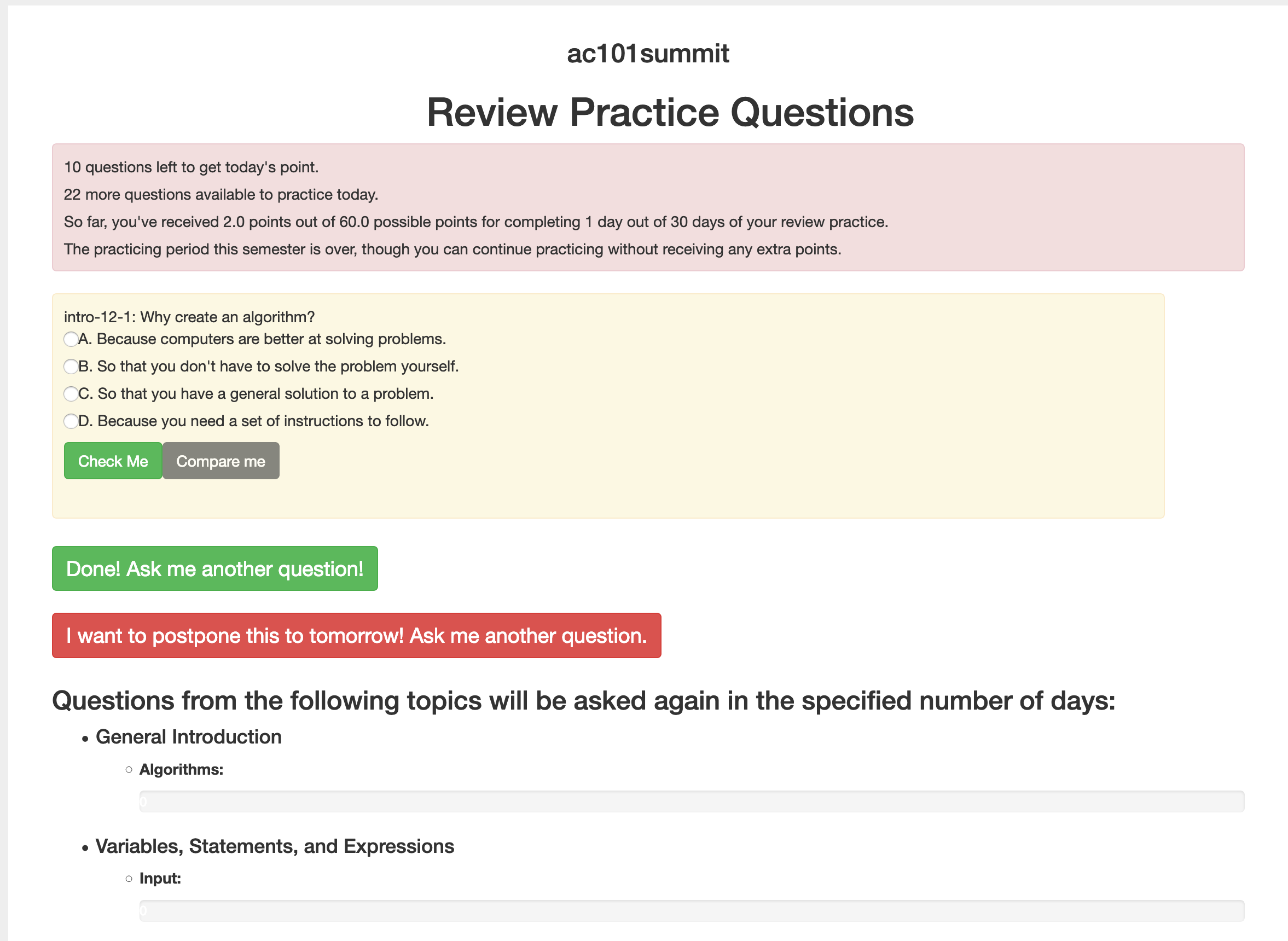
Section 6.6 The Practice Interface
How often have you had a student ask you how they could get more practice? One theory that supports this is “spaced repetition” That is, a method to have students go back and answer existing questions but a couple of weeks after the material was brand new. Its harder, because its now out of the immediate context of the reading they just did, but this type of review helps solidify a student’s understanding of the concept.
There is a paper about this in the ACM Digital Library from the 2019 proceedings. Speed and Studying: Gendered Pathways to Success, Iman Yeckehzaare and Paul Resnick.
This feature is available in most books on Runestone Academy. The exercises need to be tagged and in some cases categorized. Other books will follow as we do the work to update the source.
The first thing you will need to do is configure practice for your course. Most of the options on the configuration are pretty self explanatory, but here are a few notes.
-
If you choose to assign points for practice they will show up in a special column in the gradebook.labelled "Practice"
-
Do not forget to come back to the practice interface after you have covered a topic so that you can enable practice questions for that topic.

Once you have enabled the practice feature for the course, you enable the sections you want practice questions to come from.

The students can access the practice tool from the 👤 menu, The practice practice looks like this: