Parsons problems, also known as mixed-up code problems, are a type of coding exercise where students are presented with a set of code blocks that are mixed up or out of order. The goal is for students to rearrange these blocks into the correct sequence to form a functioning program or solve a specific problem. This type of exercise helps students develop their understanding of code structure, logic, and flow control. They can also be used for pseudocode or mathematical proofs.
The following has the correct code to ‘swap’ the values in x and y (so that x ends up with y’s initial value and y ends up with x’s initial value), but the code is mixed up and contains <b>one extra block</b> which is not needed in a correct solution. Drag the needed blocks from the left into the correct order on the right. Check your solution by clicking on the <i>Check Me</i> button. You will be told if any of the blocks are in the wrong order or if you need to remove one or more blocks.
You can include distractor blocks in the problem. A distractor is code that isn’t needed in a correct solution, such as code with a syntax error. Distractors can either be paired or unpaired.
Complete the function greater_dictionary. Given a dictionary d and an integer cutoff, return a dictionary that contains only the key-value pairs where they key is greater than or equal to cutoff.
To create your own Parsons problems, start or go to any assignment in the Instructor Dashboard "Assignment Builder". In the Exercises section of the assignment, click on "Add Exercise" and select "+ Create New Exercise" and then select "Parsons Prob".
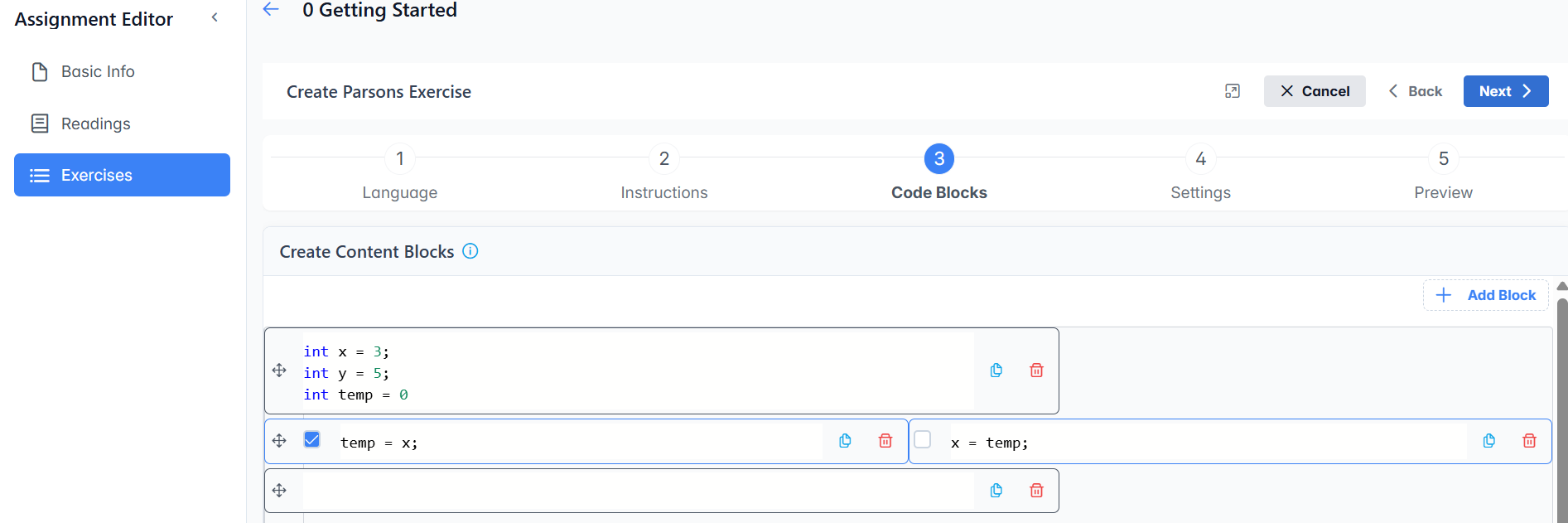
In Step 3, type in code or text into blocks as shown below. Create the correct solution for the problem. It will be randomly mixed up when presented to students. Click the "Add block" button at the top right or the + at the end of the blue line in between blocks to create new blocks. Click the copy button to create distractors and choose the correct one.
In Step 4, you can change the settings to set the chapter and section where you want the exercise stored in the assignment builder (where it will show when browsing chapters in the assignment builder), the author, the topic, the number of points for the question, and add tags to help you find the question later. If you change the name of the exercise, make sure it is unique! You can also choose to make the exercise private or contribute it to the question bank for other teachers to use. Please make experimental questions private..